How To Prevent Zombie Hack of Your WordPress Site

Hackers seek out WordPressWhen you’re the most popular system out there, you’re bound to be singled out and attacked by jealous rivals. Just look at Microsoft and Google. The jealous underdog, Microsoft, even launched a Scroogled campaign in an attempt to undermine their arch nemesis, Google, the clear favorite.

Hackers Seek Out WordPress Sites to Build Zombie Army

WordPress is an obvious target by web-surfing culprits, with over 65 million users around the world. The crime campaign of recent brute force attacks against WordPress sites is a sign that a jealous rival has resorted to subterfuge.

The password-guessing nature of these attacks means the perpetrators are scanning the Internet for WordPress installations and attempting to log in using a list of over 1,000 password and username combinations, infecting over 90,000 IP addresses in its recent campaign.

“The attacker is using a relatively weak botnet of home PCs in order to build a much larger botnet of beefy servers in preparation for a future attack,” Cloudflare CEO Matthew Prince wrote in his blog post.

In other words, they are trying to build an army of zombies for future use in a cyber attack.

3 Things To Do Now

As a WordPress site owner, this means taking preventive action against becoming infected with a zombie-building virus. Take the advice of WordPress creator, Matt Mullenweg, and make three strategic moves to prevent hack of your WordPress site.

1. Change your password

There are several ways to change your password. The easiest way is to go to your WordPress dashboard and click on “Users” in your toolbar. Next, click on “Your Profile” and scroll down to the About Yourself section and enter in your new password.

You can also access your profile by hovering over your name in the top right corner and clicking on “Edit My Profile.”

The password strength indicator will tell you when you’ve found a strong password. Check out WordPress tips to selecting a strong password, which includes what not to do when choosing a password.

2. If your username is “admin,” or a suspect on the hacker list, change that too.

Most of you probably chose something other than “admin” when creating your profile. However, if you have “admin” or a common variant (i.e., adm, admin1, administrator, manager, qwerty, root, test, support, user), change it immediately.

If your username is the name you commonly use on your blog or website, changing it is advised. Remember, changing your username is half of your site security.

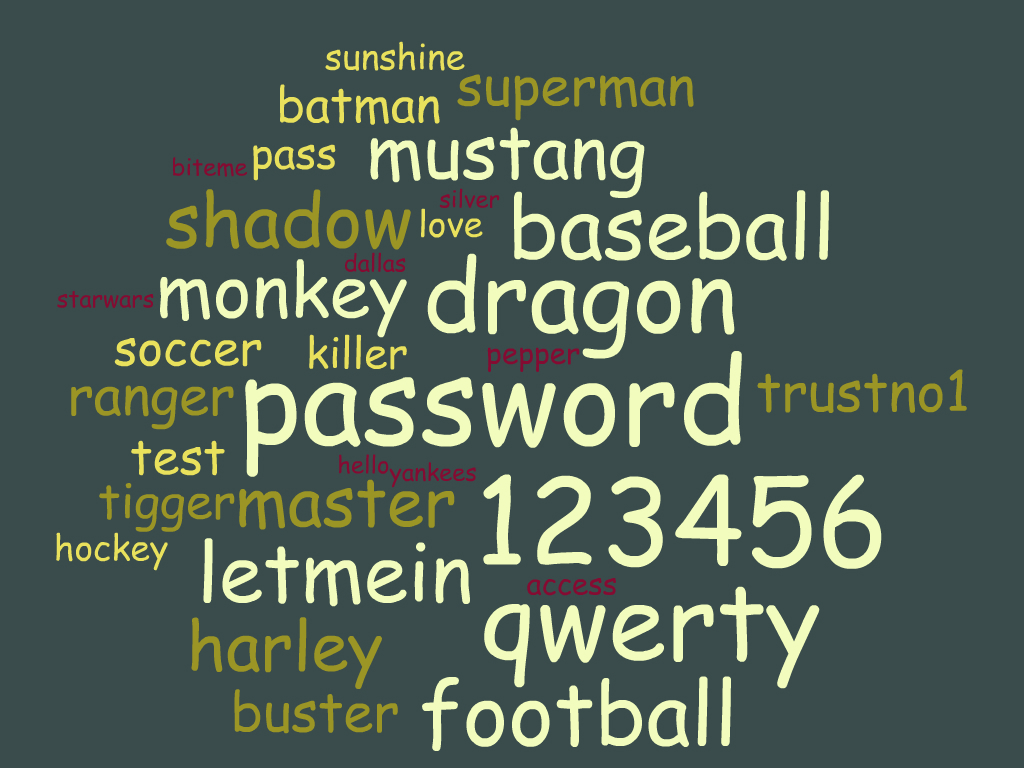
Here’s the list of the username/passwords that the hackers used in the recent brute force attack. Nothing like a glimpse into the mind of a cyber criminal, if this does indeed offer one.

For a simple step-by-step to changing your username, go here.

3. Keep your WordPress site and all plugins updated.

You know that little number that pops up next to the plugins on your dashboard? That’s the number of plugins that needs updating at any given time.

Before updating a plugin, check to see that the new version is compatible with your theme by clicking on “View version details.” Then update one plugin at a time, checking on a separate tab to see that your website is still functioning with the reload button.

Doing a website backup is another wise step before updating plugins.

If this sounds neurotic to you, then you haven’t experienced website failure from plugin conflict. If your site does go down, you’ll need to deactivate the plugin. If you can’t access your site to do this, you’ll need to go through your FTP (File Transfer Protocol).

Regular plugin updates are very important in keeping malware and hackers from finding a weak link in your site. Out-of-date and old plugins have been updated for a reason, and hanging onto them is an invitation for hackers to wrangle their way in.

If you are a Web Savvy client, call us, or call your Web hosting company to help you.

If your WordPress site has already been hacked, check with your hosting provider.

Flickr photo from Gabriel GM

Share

How to Harness the Power of Good and Influence Decisions

kittens fightingPINWhen you engage in social media, you’re not only showing the best side of your brand. You’re given the opportunity to reach the good side of your audience.

Create conversations that celebrate all that’s good, and bring out the compassion, generosity, cooperation, and altruism in your followers.

At the end of the day, you’ll feel even better about yourself and your brand.

These studies show the power of good is in demand and human nature easily leans toward the force of goodness. Here are seven ways to help your audience find the best in themselves and spread goodwill in the process.

7 Ways to Help Your Followers Choose to be Good

1. March to the Beat of the Same Drum

If you want to make someone more sympathetic, have them perform something in sync. Marching armies, religious chanting, and cultural dancing all have this “muscular bonding” as a cohesive element that encourages cooperation and “weaken[s] the boundaries between the self and the group.”

Stanford University’s behavioral psychologists asked volunteers to do different exercises in sync, including walking and singing, and then measured their cooperation through various methods. The groups who acted in sync were more willing to cooperate.

This evokes childhood games of Mother May I?, where we learned to behave more harmoniously without any adult reprimands. Could this work for encouraging workplace harmony too?

2. Spontaneity

When people have less time to think, they are more generous. Harvard researchers demonstrated how participants chose to contribute more money to the common pot for later redistribution when they reacted quickly.

When acting on first impulse, volunteers showed greater results for sharing than when they were given time to consider. The results show that people are “intuitively predisposed towards cooperation.” We become uncooperative when we are given time to reflect.

Set quick deadlines for your fundraising and charity appeals, and keep the emotional bar way up in the kindness level. People are more likely to follow their inner tendency to cooperate and donate when they have less time to think and let selfishness set in.

3. Get Awestruck

Has the vista of a starlit night sky ever sent you into a dizzying awareness of your general insignificance?

Merely thinking of an awe-inspiring natural scene is enough to produce selflessness and a focus on your surroundings. As University of California, Berkeley, showed in its Nature of Awe study, the inducement of awe is a powerful tool in creating a disinterest in self, whereas participants responding to an instance when they felt pride reported feeling more fear, more challenged, and more tired.

Give your audience a reason to be more interested in something bigger than themselves with notions of nature’s grandiose beauty.

4. Share the warmth

We are more prone to give to a stranger when we experience warmth. Based on Yale University studies on the brain and trust, holding a hot cup of coffee before investing in an anonymous person caused investment amounts to go up.

The effects of temperature on our willingness to extend ourselves and accept another’s input was measured in the insula, a tiny portion of our brain where visceral sensations are translated into emotions. When we hold something cold – an aversive sensory input – the insula registers it.

Think steaming cups of latte as you challenge your audience to make decisions – and get them to heat up too.

5. Vegetarians are More Aggressive

The sight of a juicy steak sparks the exact opposite of what you might expect. When McGill University’s Frank Kachanoff attempted to prove images of hearty beef would instill aggression, he was surprised to find the results were just the reverse.

Participants who viewed ready-to-eat photos of meat were less likely to dole out harsh reprimands than were those who were shown neutral pictures. The findings suggest that meat-eating prompts feelings of mealtime community and safety, not discord and aggression.

So display those photos of hearty, charbroiled hamburgers and grilled steaks before asking your followers for a positive and flavorful heaping of support.

6. Create a Ripple Effect

How you choose to treat others “can influence dozens or even hundreds of people,” whether you know them or not. Political scientist James Fowler, PhD, at the University of California, San Diego, and medical sociologist Nicholas Christakis, MD, PhD, at Harvard University teamed up to test participant’s selfishness in a game where selfishness was the rational choice.

Instead, volunteers mimicked the example of one another’s generosity. This ripple effect in social behavior was shown to have up to three degrees of separation (from person to person to person to person), and as a result, can spread beyond your network of acquaintances.

The critical component is making sure others witness you doing your good deed. They will mimic the observed behavior, causing the “pay it forward” phenomenon to occur in a setting where reciprocity is impossible.

The implications here are enormous, placing great potential for organizations and businesses to create a setting for this cascade of cooperation.

7. Surrender Your Fates to the Universe

While people are waiting for something they deeply desire, they’re more likely to donate their time and money, as well as show an increased sense of optimism. University of Virginia’s Benjamin Converse ran a study indicating our belief that “helping others may indulge the intuition that if one acts virtuously the universe will reciprocate.”

In other words, we believe good things happen to good people, and when we await the outcome of an uncontrollable event, we are more prone to good behavior.

For example, participants who reported having to wait on the results of pregnancy attempts, graduate admissions, and court proceedings were more likely to volunteer their time to give food for the hungry and wishes for terminally-ill children.

Encourage good behavior through offering longed-for results, and you’ve got people who are more prepared to invest in your goodwill.

Being a Force for Good

Use these potentially powerful methods with goodwill and good motives. Your ability to influence decisions toward the greater good are only as sound and authentic as your intentions.

Share

Is Author Rank Magic Waiting to Happen?

get active Google+It’s not for real…yet. Author Rank is being touted as the most significant up-and-coming SEO influence. Definitely sounds like magic, right?

Author Rank is Pixie Dust Today, a Flying Algorithm Tomorrow

When – not if - it comes into play, those who’ve been sprinkling their efforts in preparation for Author Rank will – at the very least – have established authority, according to SEO expert A.J. Kohn of The Blind Five Year Old.

Author Rank is Google’s push to rank the landslide of data in a way that will help you:

  • link to your great content
  • build a website with authority
  • get quality content into your SERPs
  • make relationships with other people in your field
  • share relevant content – your own and others

The strategic steps towards building a platform where authors will be ranked according to their content creation are already in place:

1.  Identity platform (Google+ profile)
2.  Social search (Search + Your World)
3.  Google verification method (Google authorship)

What flies next logically follows, especially when you take into account Google’s patent application and Google insider statements:

4.  Graded ranking in search results (Author Rank)

This verified author content will be given a grade that will influence its rank in Google search results. When Author Rank actually happens, that is.

In the meantime, taking the steps toward building authority is a prudent and practical move. Whereas Author Rank is still fanciful pixie dust, Google Authorship Markup isn’t hocus pocus; it’s real and you need it to stay relevant.

Here’s what else you can do to prepare for Author Rank and build authority.

  • Get active on Google+. Keep your participation on the upswing. It’s good right now for your Authorship Markup because Google is putting Google+ posts in SERPs of your circles. Think building your circles, posting original work, resharing, liking, commenting, replying, and hangouts.

  • Maintain your social profiles. This could give your overall ranking a boost, while giving you added exposure now.

  • Produce great content. Give your readers the information they want while publishing your best work. Now that your name and headshot are attached to your work through Google Authorship Markup, building your reputation is unavoidable.

Like Google Glasses, there’s a chance the technology won’t pull through to do what’s expected. But what if the fairy dust makes it fly and Author Rank is ”the next Pinterest plus Amazon plus Facebook plus the iPhone put together,” as analyst Sarah Rotman Epps with Forrester Research suggests about the glasses.

What if someday we wear Google Glasses and our brains help rank content as it travels over the lens? What if we refuse to dabble in the magic?

What if all you had to do was be a wizard in your field and sign up?


Share

Authorship Markup: How to Survive the Digital Age and Stay on Top

There’s a technological revolution going on. Anyone who wishes to survive this sweeping change must do two things, and they must do it now.

If you want your website content to stay on top in Google search results, it’s time to employ the old philosophy “better safe than sorry.” The safe thing is easy to do and risk free. If you choose to ignore the digital shift, that’s when you’ll be sorry.

Don’t Be Anonymous

The digital revolution requires authorship. This means, as Google chairman Eric Schmidt warned, you remain anonymous at the peril of irrelevance.

Thanks to Google authorship, it matters who you are. When your content is linked to your portable profile, your identity helps promote your website. In turn, your content will determine just how valuable an authority you are.

Yes, content is still king. But with a mug shot, the best content gets the higher click through rates.

authorship markupThe results showing a human face stand out from the crowd of the other faceless SERP listings. More users will be inclined to click on the identifiable headshot, don’t you think? Your authority and and their trust are two major incentives to sign up for authorship markup.

stay on top in google

In addition to the main headline, there are two more live links which readers can click. The first lands on the author’s Google+ profile and the second lands on a dedicated page with search results using the author’s name or the search query.

How to Get Authorship Markup

Here are the two things you need to do to grab the spotlight and stay relevant.

1. Create a Google+ account.

Getting on the Google+ bandwagon has many benefits. The number one reason to join right now is, you guessed it,  authorship markup.

Remember, Google+ is not a social network. It’s organized around topics and content. Copyblogger’s Brian Clark calls Google+ “the glue that unifies Google’s various offerings into a seamless whole.” In other words, Google+ is equivalent to Google.

2.  Verify Google authorship on your website.

By linking your content to your Google+ profile, your authorship – photo, name, Google+ profile link – will appear in search results for the content you create. Google walks you through the steps, making it easier than ever to implement.

Choosing a Google+ Profile Image

Think of the increased visibility your website content will receive when you link your content to a genuine human being. Now think of which photo of your fabulous face to use.

Heat map studies show that the human eye zeroes in on an image over text, and more so when there is a smiling face. When the face is gazing toward the listing (turn your head to the left when snapping the photo), the reader will also be prompted to look in that direction. Finally, when the image is large and appealing, the clicks increase.

I’m thinking I need to update mine. ASAP.

If you don’t see authorship markup results immediately, don’t worry. It seems to take a few days, and not every search result shows your picture. At most, there will be one photo per page.

Look for more to follow on Author Rank and how your SEO will be affected.

Share

Cybercrime Threatens to Break the Internet

Break the InternetCyber attacks have grown so big, so fast, and with so little preventive action in place that they’re being compared to a massive iceberg colliding with the Titanic.

“We see the threat coming [but] we haven’t taken adequate action to prevent harm, and every week the threat gets a little closer,” James Lewis, director of the technology and public policy program of the Center for Strategic and International Studies in Washington, was quoted in The Hill.

Last week saw the largest cyber attack in history. A DDoS (denial-of-service) attack at 300 gigabytes per second was aimed at Spamhaus, a European nonprofit organization that works to block spam from the Internet. A mere 50 gigabytes per second can derail a large bank.

Internet Highway Gridlock

DDoS attacks are like a giant traffic jam, where all the cars are trying to enter through a single gate, and everyone must show an ID card to get through. In the case of Spamhaus, CyberBunker, a web hosting service angry over being blacklisted, targeted them with an unprecedented amount of traffic in an attempt to make the service unusable.

As traffic clogged the Internet, other exchanges were affected and Internet slowed for mostly European users.

CloudFare, hired by Spamhaus to deflect the attacks, helped keep the site online. CloudFare’s co-founder and CEO, Matthew Prince, said, ”I do expect that this record for the largest attack won’t be held long.  [A larger attack] could dwarf this in size. And that may, literally, break the Internet.”

Further damage occurred last week when three scuba divers tried to cut one of the main underwater cables that connects Europe off the coast of Egypt. Disrupting Internet service in Egypt and slowing down Internet connections as far away as India and Pakistan, the congested data was forced to flow the long way around the globe.

USA Launches Cybersecurity Order

In an effort to quell cyberespionage, Obama signed an executive order in February. The recent upsurge in Chinese hackers waging a cyber-spying campaign on U.S. businesses raised new security issues and new measures, including a ban on government agencies from buying China-made computers.

Not only are businesses and government agencies at risk, the people who are infiltrating our critical infrastructure are capable of wiping out  “our power grid, our financial institutions, and our air traffic control systems,” Obama said.

So what can you do?

“Clicking the Link” Strategies from the Department of Homeland Security

The Department of Homeland Security offers strategies for helping to prevent cyberattacks, focusing on email attachments.  Being educated on the “clicking the link” pitfalls is a critical first step in staying safe. Security tips won’t prevent all serious threats from crashing websites, but they will give you a road map to avoid common traps, including chain letters, email hoaxes, and urban legends.

Check Out These Kitties!

The growing threat has led some employers to adopt a program designed to educate employees with a simulated cyberattack.   By sending emails with links enticing people to click to see more adorable kitties, companies are training workers through “ethical hackers” to learn the techniques of true hackers.

DHS checklist for personal cybersecurity:

  • Never click on links in emails. Even if you think it’s a legitimate email, go to the site and log on directly.
  • Never open the attachments. Retailers will generally not send out emails with attachments. Only open attachments from known contacts and after checking the sender’s email address.
  • Do not give out personal information. When on the phone or in an email, either ask for a number to call them back, or contact the agency directly to verify the request. 
  • Set secure passwords and don’t share them with anyone. Avoid using common words, phrases, or personal information and update regularly.
  • Keep your operating system up to date.  This includes your browser, anti-virus, and other critical software.
  • Pay close attention to website URLs. Malicious websites sometimes use a variation in common spelling or a different domain (for example, .com instead of .net) to deceive unsuspecting computer users.
  • Turn off email option to automatically download attachments.
  • Be suspicious of unknown links or requests sent through text message as well as email. Do not click on unknown links or answer strange questions sent to your mobile device, regardless of who the sender appears to be.

Have you been caught unaware through an email or other cyberattack method? What is your experience of cybercrime?


Share

What to Do When Your Web Site Goes Down

Your web site goes down

Flickr Creative Commons by SanGatiche

Your web site is down. Your customers are unable to find you. Your business is an unreachable Internet entity. Your frustration level reacts with a terminal velocity akin to Superman.

Relax. It’s inevitable that your web site will experience some downtime. Servers are not in a position to guarantee 100% site uptime.

A .1% Downtime Is Over 8 Hours a Year

Maintaining 99.8% uptime means nearly eighteen hours of downtime a year. When you experience web site downtime, you’re experiencing what every site owner experiences.

Even top sites have to manage site downtime. Here’s the evidence: Check out the site downrightnow where favorite web services are monitored for status alerts on any site issues, including Facebook, Gmail, YouTube, LinkedIn, and Netflix.

Where There is Internet Service, There is Interruption

Before you notify your web host provider, here are several things to check to be sure the issue is with your web site.

1. Refresh your web site page.

By clicking the “reload” button located next to the web site address at the top of your screen, your browser if forced to download the most recent version of your web site.

2. Try to connect to another well-known web site, such as Google.com.

If your web site page won’t reload or you can’t access a different web site, then the problem is an internet connection issue and you should contact your internet service provider.

3. Check your domain registration at Whois.net.

By entering your web site name, you can check to see if your domain name registration has expired and if you simply need to renew your registration with the domain name registrar to get your web site back up and running.

If you have a web site provider like Web Savvy Marketers, we take care of this for you before it ever expires.

4. Contact a friend and ask them to check your site as a last-ditch effort to be sure it’s down.

They can also check Where’s It Up or Down for Everyone or Just Me to see if your site is down for others and not just you.

5. Call your web hosting provider.

When it’s an issue that lies with the server, your web hosting service will be able to make the necessary calls to confirm any technical difficulties to get your site up and running again.

Major server issues are not uncommon, as in the major web host and domain registrar GoDaddy outage, which took down millions of sites.

The World Wide Web runs 24/7, which means your website is continually open to technical problems as well as cyber attacks. Cyber thieves continually compromise Internet security. The FBI has had to step in, shutting down thousand of sites in an effort to do a global clean up.

We Fix Your Website Woes

Having a web hosting provider you can easily reach, whom you can count on to be available to take your phone calls when your web site’s function is in question, is the key to obtaining quick recovery to web site problems.

Let us know if we can help with your web hosting questions by leaving a comment below.

Share

The Hashtag is Invading

Facebook incorporates HashtagsAmidst the Internet rumblings of a #hashtaginvasion, there are those who remain blissfully unaware.

“Why is there a number sign before all these highlighted words?” my husband asked me this week as he checked out my latest tweets on Twitter.

Even my college-aged son, who’d been creating his own off-the-wall Twitter hashtags for weeks, didn’t realize that hashtags are links to a common page where all other hashtags like it can be followed.

The Demise of Hashtag Ignorance

This obliviousness is about to change. The goliath of social media, Facebook, is stomping into your Timeline, hashtags in hand.

No longer will you be able to avoid it, much to the distress of hashtag-bashing opponents. Facebook page “This is Not Twitter. Hashtags Don’t Work Here” recently hit 10,000 fans, with the cause “If you can’t click it, it’s not real.”

Reality is about to change. With hashtags working on Facebook, will users take to it like they do on Twitter? We can be sure of one thing. Facebook’s hashtag invasion will assure more people understand it’s use.

And You Thought Hashtag was a Weird Name

Hashtag has a unique history in the name “octothorpe.”  It seems that Bell Laboratories’ scientists made up the name for the newly added key with the eight-pointed edges symbol, what we commonly call the pound key, made to send instructions to the operator.

Today the hashtag continues to send instructions in the form of common topics, conversation beginnings, and search options.

Hashtags are used on Twitter as keywords or phrases (with no spaces) preceded by a hash mark (#) to identify a topic of interest, create and facilitate a search, and categorize Tweets.

Hashtag Envy Breeds Copycats

A good thing begs to be imitated. Whereas Twitter refuses to buddy up with Facebook-owned, hashtag-using Instagram, its new photo-flame, Flickr, has just introduced an IOS app using – you guessed it – hashtags.

It doesn’t stop there.

Google+ has adopted the hashtag, listing its Trending Topics with hashtag-laden keywords, promoting awareness on topics such as #DownSyndrome and #WorldWaterDay.

As of now, hashtags don’t have functionality on Facebook or Pinterest, although people add them to status updates and pin descriptions, much to the annoyance of those who understand how they work.

Once Facebook incorporates the hashtag function, it will be similar to tagging for people and location with the @ symbol. With the # symbol, anyone who wants their posts easily searched and categorized can create public posts based on specific keywords.

Hashtag is Still a Weird Name

There are those out there, undoubtedly from Twitterland, who are born and bred on hashtags. A baby girl recently named Hashtag marks the level of social media preoccupation some of us share.

France is not immune to the hashtag infiltration, although they’ve banned the use of the word. Instead, social media followers must use the French term for “sharp word.”

What else is there to do but accept the pointed-edge invasion and follow the hashtag links? Is our social media destiny to be a clamoring for hashtag acknowledgement and authority?

Are you a hashtag supporter? Let us know in the comments.

Share

Photos are Getting Bigger: On Facebook and Beyond

Facebook Gives Visuals the Royal Treatment

Facebook pictures betting biggerContent may still be king, but images, videos, and music are holding higher court on Facebook. Facebook’s changes in its News Feed include new ways to filter what you see as you pay homage to the stream of information. No longer will the various feed options be hidden in the left sidebar.

Oh, you didn’t know about those either? They’ve been spread out among the Newsfeed, Pages, and Apps categories, where you’ll still find them until the upgrades are fully dispersed.

With the News Feed upgrade, front and top-center or top-right (depending on what type of device you’re on), you’ll find options for a photos feed highlighting Facebook and Instagram photos, and a remade music feed sharing what friends are listening to, as well as new albums and concerts.

Instagram Takes the Stage

The format is very much like Instagram in its clutter-reduced and photo-focused approach. Richer content, larger visuals, and interactivity is designed into the News Feed as cross-platform features. Whether you’re viewing on a smartphone, tablet, or laptop, the results will be similar.

Images from both friends and advertisements are larger as part of this new wave of dedicated feed. Since acquiring Instagram, this is a strategic move to utilize the power of the photo. Studies show that we process images 60,000 times faster than text, and Facebook photos generate more engagement than text alone.

Read: more likes, comments, and link clicks, all in less time. Larger imagesFacebook images


It’s easy enough to satisfy that basic desire to respond to images in Facebook and drive more traffic to your website. Instead of sharing as a link, which brings up a smaller-sized photo (these screen shots are pre-News Feed updates), add as a photo and include a comment with the relevant link.

Be sure to always include a live link to allow easy click-through to your website. With the add photos/video option, you can share more than one photo to further engage your users.

Photos are Content’s New Queen

Photos are growing in size and number everywhere. On Google+, the cover photo specs just got bigger, so be sure to update yours with an eye-catching maximum resolution of 2120 x 1192.

Larger photo backgrounds are a fast-growing design trend and large images on website homepages are surging on the swell of the photo-riffic movement. While these make marketing sense in capturing your visitor’s attention, other photo trends lean more towards the unconventional.

Stranger Than Photo Fiction

Facebook’s Poke app came out soon after Snapchat, both boasting disappearing photos and videos for your ephemeral viewing pleasure. With Poke, the photos and videos are only viewable for up to ten seconds before they disappear, and a warning will appear if a screenshot was taken.

Beware of the temptation to send something you’ll regret later. Sources say that disappear is different from delete, however, and there are ways to record Poke videos permanently without alerting the sender.

Stemming from the disappearing-photo craze are horror stories based on the phenomenon. And any picture-taking and photo-sharing culture wouldn’t be complete without the bizarre Pretty Girls Making Ugly Faces as seen on Reddit, a user-generated social networking site similar to Digg.

Let us know what you think of the Facebook News Feed changes. Do you think that visual integration is at a saturation point, or are we merely skimming the surface of a potential image-laden future?

Share

This is Your Brain on the Internet

Are you a victim of the internet?

Flickr photo: Wallula Junction

If you’re reading this, you may already be a victim. Driven to distraction with the Internet, you are well on your way to becoming part of the “pancake people” phenomenon.

Those of us – and we are many – who have fallen under the spell of instant gratification, information overload, and easy access, are at risk of mirroring the World Wide Web that we are so intimately connected with: “Spread wide and thin” like pancakes, as playwright Richard Foreman describes the Western culture.

If you find it difficult to read long essays, rarely ever read books, and find yourself bouncing from link to link, skimming instead of actually reading, you’re in danger of growing flat. What’s missing from today’s computer-centered thinking is “deep reading,” which leads to deep thinking.

Allow Yourself Time to Think

“Sound bites, text bites, and mind bites are a reflection of a culture that has forgotten or become too distracted by and too drawn to the next piece of new information to allow itself time to think,” writes Maryanne Wolf, developmental psychologist at Tufts University and the author of Proust and the Squid: The Story and Science of the Reading Brain.

She worries, as do I, that the “digital glut of immediate information” threatens to erode intellectual effort. What will we be left with?

Screaming goats and Harlem Shake videos, for starters.

This is what competes for our attention when surfing the Net. But it’s all so entertaining and, well, distracting. In part it’s easy to consume because it’s quick. Harlem Shake videos are capped at thirty seconds. Screaming goat videos are often shorter.

I ask you, is Google making us stupid?

“Apparently, it is,” Super Savvy Carolyn answered, when I explained these inexplicable video crazes.

Is Six-Second Brevity the Soul of Wit?

Shakespeare’s long-winded Polonius in Hamlet ironically proclaims that brevity beats beating around the bush, leaving us to ponder exactly how and where this applies.

Pare viewing time down to a mere six seconds with Twitter’s new app, Vine, which boasts creativity-boosting acumen in its super-short video looping. Like Twitter, with its 140 character limit, Vine hopes to launch unexpected inspiration through similar constraints.

The shortened writing trend in twin culprits Tweeting and texting continues to promote, if not creativity, short-circuited thinking. A far cry from email, and our parents and grandparents thought that was a sad move from the now-archaic handwritten exchange.

“Searching for Dummies”

Don’t get your digital reading brain all in a tither just yet. The studies on how all this short-and-quick information decoding and viewing affects our thinking aren’t complete.

One study suggests that for people with prior Internet search experience – that’s you and me – our brain’s neural circuitry is improved. “Your Brain on Google: Patterns of Cerebral Activation during Internet Searching” leaves us with hope, which tends to spring eternal.

Further hope is from a review in the Journal of  Communication (ISSN 0021-9916) on the books The shallows: What the Internet is doing to our brains, by Nicholas Carr, and You are not a gadget: A manifesto, by Jaron Lanier, showing there’s little evidence that our minds are being warped by Internet consumption.

The alternative, however, is unthinkable.

As technology visionary Edward Tenner wrote in the New York Times in 2006, “It would be a shame if brilliant technology were to end up threatening the kind of intellect that produced it.”

Have you experienced mind-altering repercussions from so much Internet exposure? Do you worry about how this affects the way we think? Let me know your thoughts.

Share

Content Marketing and Copywriting: No Sibling Rivalry

Marketing Family TreeTo understand what content marketing and copywriting are – both integral components of your marketing package – try looking at them as part of a family tree.

Publicity Meets Business

As one of my favorite tweeples and copywriters, Matt Loomis, explains, because Copywriting and Content Marketing are seen as such closely related branches on the family tree, many people might consider them to be twins.

Not so close as that. Copywriting and Content Marketing are, however, definitely siblings, both the progeny of their illustrious parents, Publicity and Business. When these two got together, the family tree began its inevitable climb.

The First Child Arrives

It wasn’t long before Publicity and Business bore fruit, creating Copywriting. Their adored firstborn, whose natural traits included enthusiasm, creativity, boldness, and persuasion, was coddled and indulged. His aptitude grew for all things commerce.

His wise parents raised him well, teaching him all aspects of advertising, including how to create brochures, direct mail, press releases, radio and television scripts, and website writing. All was well with the world.

Then, as Matt Loomis goes on to explain, because change is unavoidable, the family tree experienced some unexpected growth.

The Family Expands

It wasn’t until much later, as Publicity and Business neared the ripe age of grandparenthood, that their surprise second child announced herself. Content Marketing was born.

She was embraced with equal warmth and devotion, basking in the attention of her parents and her older brother. She excelled in the bright new land of the World Wide Web. Her natural gifts of generosity, confidence, friendliness, and worldly-wise intelligence afforded her to meet the increasing challenges and opportunities of the Internet: white papers, videos, eBooks, social media updates, and blogging.

Sibling Compatibility

As Matt Loomis points out, Big brother Copywriting and younger sister Content Marketing share a terrific relationship. They both understand the importance of knowing your audience. And because neither feels the need to control or outshine the other, they live side by side without quarrel.

That’s not to say they agree on everything.

Copywriting insists on getting straight to the point. He sees the end goal at all times and can be very focussed on completing his objectives. His sister Content Marketing prefers to linger awhile, make friends, engage in friendly conversation, and be the sweet harvest that brings people to her.

She’s the irresistible apple. Her brother is, well, more like the straightforward salient snake.

The competition they sometimes engage in is a healthy way for them to learn cooperation and teamwork. As a matter of fact, they both agree that they wouldn’t happily exist without the other.

Their parents couldn’t be a prouder set of tree limbs.

It’s a Family Thing

A big thank you goes to Matthew Loomis for his illuminating family analogy! Thanks to him, I understand the unique relationship of Content Marketing and Copywriting as two branches of the same tree.

Whether you’re geared for the direct sales approach – using Copywriting for an urgent call to action, or you’ve discovered the inbound marketing strategy works well – a Content Marketing approach to giving away free content and attracting followers who become customers, each one has its strengths for your business.

When creating a marketing plan, these siblings work together to help your business grow. How have you experienced the benefits of this happy family tree?


Share