Web Savvy Marketers

  • About
  • Services
    • Strategic Planning
    • Marketing Programs
    • Full-Service Web Design and Development
    • Content Marketing
  • Industry
  • Portfolio
  • Blog
    • Tools & Tips
      • Google Tips
      • Internet Scams
      • Motivational
      • Tips for a good website
      • Website Writing Tips
    • Marketing
      • Internet Marketing 101
      • Philanthropy
      • Search Engine Optimization (SEO)
      • Social Media
      • Web design/Internet Marketing
    • Web Design
      • E-commerce
      • Website Maintenance
  • Contact Us

Consistent Communication – Part III

July 1, 2020 Beth Devine

We’ve talked about the importance of creating a segmented database and determining the “voice” of your different messages depending on the audience you are targeting. Now let’s discuss what is worth saying. This is probably the biggest challenge our clients face. What should we talk about?

To help them answer that question, we’ve found that interviewing them on a regular basis can be beneficial. Most of the time, the interview starts with a simple, “What’s new?”—and the response is usually, “Same old, same old.” That’s to be expected, but because we approach these interviews from an “outsider” perspective, we’re able to help the clients uncover topics that might be interesting to their audiences even if they aren’t so interesting to the clients themselves.

A 15-minute chat can often yield three or four great ideas to write about. If you don’t have access to someone from the outside to do interviews like these, have one of your employees do it. Just sit down and talk about what the business is up to, and you’ll probably find that the process will help you to formulate messaging.

It’s a common theme among manufacturers—they are so busy with day-to-day operations that they don’t realize that what they are doing can be really interesting to someone from the outside, particularly prospective customers. For example, maybe you just bought a brand-new piece of equipment and brought it online. Does it increase your capacity or give you a capability that you didn’t have before? Customers and prospects will want to know about that! Is it a great new technology? Employees and recruits might really get excited about it!

You also should think about what you are doing in relation to what’s happening in your industry or in the world at large. Since early spring, the focus of almost every aspect of our lives has been the pandemic. What did you do during this time? Did you focus on helping, like encouraging volunteering or making donations? For instance, several manufacturers in Berlin created a Local Lunchtime Challenge in which they purchased lunches for their employees from local restaurants. It demonstrated their appreciation to their workers, who were going above and beyond to keep the manufacturers going despite the overwhelming challenges, and it also funneled business to restaurants in the community. And by making it a “challenge” and sharing it, they encouraged as many companies as possible to join in. That is a great story!

If you can’t come up with a story from inside your business right now, you can always share other information that you find interesting. Look for articles about manufacturing, business ownership, COVID-19, or anything else that you find informative and helpful. Simply write a quick introduction about why you find the piece worthwhile and then share a link to it. People always appreciate good, practical stories that give them information they need.

So, when you set out to create a message to share with your network, look for something that falls into one of the three categories we’ve talked about:

  • What are you working on?
  • What is going on in the industry or the world? (e.g., COVID-19)
  • What is something I’ve found interesting and helpful?

Filed Under: Marketing, Tools & Tips

Consistent Communication – Part II

June 24, 2020 Beth Devine

Last week, we addressed the need for a segmented database. Once you have that, it’s time to determine your message. Before you start writing blog posts or sending out e-newsletters, you need to decide on the “voice” of your messages. Is it going to be very professional or more casual? Will you be speaking in the first or third person? Will it differ depending on the audience? These are important things to consider before you even begin writing.

To make these decisions, you must first understand your brand. People often think that a “brand” is something that’s important for consumer products or big corporations like McDonald’s or Apple or any of those instantly recognizable logos that come to mind. But every business has a brand, whether they think they do or not. If you have customers, if you have people who are willing to give you money for something, you have a brand. A brand is like a promise. It’s everything that people know in their gut about your company—what they know they will get when they do business with you. It is what differentiates you from your competitors in the minds of the people you want to do business with.

So when you develop messages—LinkedIn posts, advertisements, press releases, email marketing, job postings (those are incredibly important right now)—keeping your brand foremost in your mind as you create them will help you to achieve consistency even though you are crafting the language to appeal to specific audiences.

One way you can flesh out your brand in your mind and use it to craft messages is by using the marketing tool called a SWOT analysis. You’ve probably done that at some point—and if you haven’t done it recently, we’d encourage you to do it especially as we enter a post-COVID 19 world, because so much about the marketplace has changed. If you aren’t familiar with the concept, the letters stand for Strengths, Weaknesses, Opportunities, and Threats. Your brand message should primarily emphasize your Strengths and Opportunities, and as much as possible, downplay your Weaknesses and Threats.

Quick example: Say your biggest strength—your differentiator, your uniqueness—is that you’ve been in business in your field longer than anyone else. You have massive experience. An Opportunity could be that you are incorporating new product lines so you can serve new customers. Perhaps a Threat is that other companies can afford to sell more cheaply than you. When you sit down to craft a message, you’ll want to keep in mind words like “respected,” “valuable,” “experienced”—because you want to attract the attention of people who value the same things you value (customers AND employees). You don’t want people who need products fast, cheap, and in bulk. That’s not you.

So get clear on your brand and what you have to offer, and WHO you want to attract. Then you can tailor your messages to your target audience while still maintaining some consistency.

Finally, a message needs to be about what matters to the person RECEIVING it, not the person sending it. If you are introducing a new product to the market, that’s a great thing to communicate. But the message needs to be about what problem it solves, and how it can make people’s work easier or their lives better. Get out of your own head. Your innovation and how smart you are for coming up with it—that’s not as important as how the product will be used.

This is especially important in the post COVID-19 market. People are helping people. Your products are helping people. I’d bet that everybody reading this has been creating something or doing something that is service-oriented over these last couple of months. That’s where the world is right now, and that’s the tone in the market. So keep that in mind. Why does what your are doing MATTER? If you talk about that, people are going to want to hear what you have to say. Next week, we’ll discuss What’s Worth Saying.

Filed Under: Tools & Tips

Importance of Consistent Communication – Part I

June 17, 2020 Beth Devine

Last month, we had the privilege of presenting during CCAT’s webinar on “Using Technology and Effective Communications to Market your Business.” Although consistent communication is most often equated to business development, it is important for so much more.

That’s especially true right now, during this time of uncertainty and rapid change. Your marketing communications aren’t just a touch point for your customers and prospects—they can provide comfort for your employees, show your support for your community, and help you stay in touch with all shareholders. During our part of the webinar, Cheryl and I covered several topics:

• Who do you want to talk to?
• What is your message?
• What’s worth saying?
• How do you get the word out?

Over the next few posts, I’d like to cover each topic in more detail. Let’s start with the first one.

Who do you want to talk to?

The obvious answer to that question is:

• Customers
• Prospects
• Employees
• Potential Employees
• Other Shareholders

The follow-up question is, “Do you have a method to reach out to them?”. If you don’t have a solid database, now is the time to work on one. Implementing a CRM (customer relationship management) tool is the way to go. We recommend looking into a platform that also offers an in-bound marketing program.

Salesforce is one platform that offers a super CRM tool, and HubSpot is an excellent in-bound marketing program. For many companies, however, these options are cost-prohibitive. Smaller companies might need to look for a more affordable alternative, and they do exist. There are platforms available that combine a CRM with in-bound functionality to offer all the features a business-to-business company would need, at a price much lower than you might think.

Whatever you choose, make sure you segment the list so you can tailor your messages to specific audiences. Also, use all platforms for communication. For example, be sure that you’re LinkedIn to all customers, prospects, employees, and anyone you’d like to employ in the future. It’s okay to be seen in more than one place. It’s just another touch point.

Once you have your method of communication set, you can begin to form and broadcast your message. We’ll talk about strategies for that next time.

Filed Under: Tools & Tips

How Manufacturers Can Communicate Their Capabilities During a Time of Crisis

April 6, 2020 Beth Devine

Letting people know what you can do at this time is a public service.

The COVID-19 pandemic crisis is affecting every individual and every business in America. Sadly, a lot of companies have been forced to suspend operations as demand has fallen off—but for many manufacturers, demand is as great as it ever was, if not exponentially higher. If you are an essential manufacturer who is up and running during this national emergency, you owe it to your customers and the general public to let them know.

This isn’t about raising your profile or marketing your company. Companies like yours are filling vital needs right now, and people are looking for information about your capabilities.

Here are some ideas for how you can get the word out:

• COVID 19 Capabilities Page – Think about what your company is doing (or is capable of doing) as it relates to COVID-19. Have you switched over to manufacturing PPE or other critically needed emergency equipment? What have you done to ensure that your supply chain will be uninterrupted? Have you made changes with the materials you use to reinforce safety and sanitization? These are things people need to know! Create a page or section on your website detailing how your business is addressing COVID-19, and make that page easy to find. Put it in the Capabilities dropdown on your navigation or feature a link to it on your homepage.

• Protecting Your Employees – You have probably taken major steps to protect the health and wellness of your workforce, too. Add that information to your website so people know how serious you take your commitment to keep your employees safe while staying in business. This could be part of the COVID 19 Capabilities Page or you could create a standalone page to thank your employees.

• Press Coverage – If you have the ability to meet a lifesaving need, reach out to the media and let them know. Now is not the time to be shy about communicating your know-how or your capacity to ramp up if needed. A press release detailing what you can do could put you in front of someone who urgently needs your products or capabilities.

• Industry Outreach – ThomasNet has put together a database of manufacturers and their capabilities as they relate to COVID-19 needs. Be sure to share your information with them, as well. Also reach out to your industry publications to learn what information they’re looking for.

• Blogging – Add all this information on your blog, and post regular updates. Things are changing quickly, and you will want to keep visitors to your website up to date on everything you are doing. Make it easy for anyone with a need to quickly understand how you can help.

As an essential manufacturer who is operating during this time of crisis, you are helping to keep our country running. Communicating your capabilities is a service both to your customers and the general public, so don’t neglect to do it. If we can help, please don’t hesitate to reach out.

Filed Under: Tools & Tips

Announcing New Web Services Provider

August 28, 2018 Beth Devine

Web Savvy Marketers is excited to announce that we have partnered with Jonesen to provide you a whole new level of web hosting, web design, security, and development services.

Web Savvy Marketers partners with Jonesen for web services

We recently transitioned our focus from web design, development, and hosting to Marketing, specifically: copywriting, blogging, SEO, and PR.  Since then, we decided to partner with Jonesen to ensure you were given the best care possible going forward, and to allow us the ability to focus our full efforts on our Marketing services.

Jonesen is a web agency with over 15 years of experience delivering creative solutions to clients coast to coast. We have been working together behind the scenes to ensure that this will be a step up in service and security for your business.

Here’s what to expect next:

  1. First rate service from the Jonesen team
  2. Over the next few weeks, the Jonesen team will be evaluating your websites and reaching out to go over your plans for the future and how they can assist with getting you there
  3. Future invoices for website services will be generated by Jonesen and all future payments should be routed to them as well

If you have any questions please feel free to reach out to either us or Charles Elliott at Jonesen. Existing web hosting customers have been sent an email with contact information for Charles. Please contact us if you have not received the email or if you need us to resend the contact information.

Filed Under: Featured, News, Website Maintenance

Does GDPR apply to you?

May 24, 2018 Beth Devine

Overview of GDPR and how it affects small business owners in the US. With specific links and resources for businesses with e-commerce websites and those running WordPress and WooCommerce.

What is GDPR?

General Data Protection Regulation (GDPR) definition: https://en.wikipedia.org/wiki/General_Data_Protection_Regulation

The regulation was created to protect privacy for all individuals within the European Union and European Economic Area.

The regulation requires that personally identifiable information being collected about individuals inside the EU be processed and stored to protect the data privacy.

  1. Information must be stored using pseudonymization or anonymization.
  2. Data is not available publicly without explicit consent.
  3. Consent to use data can be withdrawn by the consumer at any time.
  4. The processor of data must clearly disclose what data is being collected; how it being collected; why it is being processed; how long it is being retained and if it is being shared with third-parties.

Who does this affect?

This applies to any online business that collects and stores personally identifiable information from individuals or entities in the EU.

How this might affect Web Savvy Marketer customers:

  1. If you have an e-commerce store and sell to customers in the EU
  2. If you collect personal data from EU customers for any reason
  3. You can not send unsolicited emails to anyone. You can not purchase lists, or merge lists from different companies into your list.
  4. You can not auto email from abandoned shopping carts, unless the shopper has opted in for email.

Actions steps to take if GDPR affects you

  • Make sure your website has an SSL certificate installed so data collection/storage is encrypted
  • Review and update your website’s privacy policy
  • Remove all automatic opt-ins on your website, get a clear consent prior to collecting data
  • Set up process to delete user information upon their request
  • Set up process to monitor for potential data breaches and notify users if their data has been affected by a breach
  • Review your mailing lists for compliance

For more detailed information please review the following resources:

GDPR Overview
  1. Get a quick overview with this Infographic: http://ec.europa.eu/justice/smedataprotect/index_en.htm
WordPress related information:
  1. https://www.codeinwp.com/blog/complete-wordpress-gdpr-guide/
  2. https://wordpress.org/plugins/wp-security-audit-log/
E-commerce websites
  1. Good overall resource in clear language with specific information on what to include in privacy policies and recommendations for data collection. https://www.willows-consulting.com/gdpr-for-ecommerce/#
  2. Woocommerce websites: https://woocommerce.com/2017/12/gdpr-compliance-woocommerce/
  3. Additional Woocommerce resources: https://woocommerce.com/gdpr/


Filed Under: Carolyn's Posts, E-commerce, Email marketing, Featured, Marketing, News, Tools & Tips

5 Low-Budget Marketing Tips to Boost Your Business

March 12, 2018 Beth Devine

Who says that marketing has to be expensive and hard? Sometimes the simplest ideas are the most effective. Check out these 5 marketing tips to help your business stand out without breaking the bank.

  1. Be consistent with your messaging: People need to recognize you, no matter where they see you.
  2. Track your online reputation: Use social media, but you don’t need to be on every platform. Look at what your customers are using and use that.
  3. Build a network: Word of mouth is the most prevailing type of marketing, plus it’s free! So build those relationships with professionals that you would happily refer your customers to and who can send referrals your way.
  4. Update your website: If your business doesn’t have a website, you are missing out. People will be searching for you online, make sure your information is up to date and accurate.
  5. Blog: Why should people come back to your website? Be sure to give people a reason to keep coming back. Give them tips, product updates and blog!

These are just a few simple (and free!) ways to get your marketing off the ground. Which of these marketing trends are you working on incorporating into your strategy?

Filed Under: Amber's Posts, Featured, Tools & Tips

Take Your Business to the Next Level with Co Branding

March 7, 2018 Beth Devine

Are you looking to introduce your brand into new markets? Perhaps you want to expand in markets that you’re already in. Or maybe you need to jump start your brand. Co-branding may be the ticket for you.

Co-branding is a concept that has continued to become more attractive over the years. The concept is described as the combining of two or more brands to create a single, unique product or service. With new products and services constantly hitting the shelves, a co-branding partnership may sound a little absurd. After all, why would you share information and resources with a potential enemy?

There are actually a lot of benefits to working with a partner vs. doing things on your own. The key to a successful partnership is to choose a brand that will best complement or enhance your product. More companies are uniting and launching co-branded partnerships, a once thought risk has been proven to be a win-win for both parties.

Check out some successful co-branding partnerships:

  • GoPro & Red Bull: “Stratos”
  • Spotify + Starbucks
  • Nike & Apple: Nike+
  • Uber & Spotify: Soundtrack for Your Ride
  • Bonne Belle & Dr. Pepper: Flavored Lip Balm
  • Pottery Barn & Sherwin-Williams: Color Your Room

Still on the fence? Here are some reasons why you should consider a co-branding partnership.

  1. Shared Customer Loyalty: In co-branding, loyal customers of one brand will display the same affection for the other.
  2. Extend Reach: Co-branding can increase the visibility and market share of both partners.
  3. Share Costs: One of the biggest benefits is that marketing costs are split between both parties, allowing for more creative ideas and opportunities.
  4. Boost Sales: Co-branding can significantly enhance the sales potential of a product or service, compared to a similar offer showcasing only a single brand.
  5. Customized Product: A successful co-branding partnership delivers a better product that fulfills the needs of the customers in a better way.

If you are looking to co-brand, be sure to choose your partner wisely. Look for someone that complements or enhances your brand AND make sure that your customers have a positive opinion about the other company, or your brand may lose some of its appeal.

Filed Under: Tools & Tips

What’s a Widget?

March 4, 2018 Beth Devine

Remember when a widget was a thing you called something when you couldn’t remember what to call it?

Not anymore. WordPress turned the widget into a real thing. Or is it?

I’ve found that many new WordPress users have a little trouble understanding the Widget concept and how it fits into their website.

What is a WordPress widget?

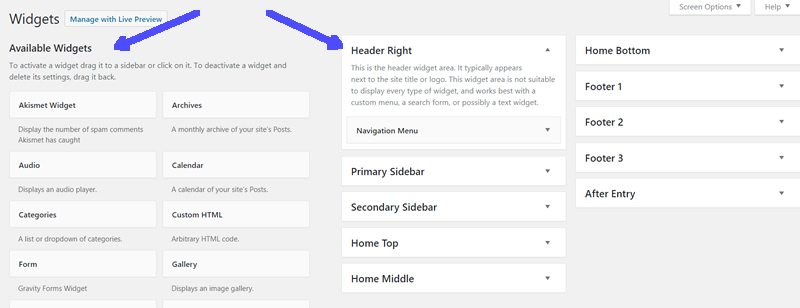
The widget is a section under Appearances where you can add content to a section of the website. Typically and historically the widget areas were designed to be used on  parts of the website that appear on many pages. Sections like the primary sidebar or the footer area are typical places where you might want to include data on many pages. Data you may want to include on many pages might be your address, a menu, e-mail sign-up form, a contact button, Social media links…you get the idea. By using a widget you only set up the data once and it appears on in multiple locations.

When you open up your Widget area under Appearance>Widgets, you’ll see something similar to that shown above, with the Available Widgets on the left side and the Widget Areas on the right. The basic concept is to pull the widget you want to use from the available Widgets into the widget area where you want the widget to display.

The Available Widgets may vary by theme or if there are plug-ins installed, but I’ve found that I use these types of widgets pretty frequently:

  1. Custom Html – used for placing code or scripts from another source (such as an email sign-up form
  2. Image – allows you to insert an image from your media library
  3. Navigation Menu – Adds a custom menu
  4. Text – Add text – handy for addresses, phones numbers, etc.
  5. Search
  6. Video
  7. Audio

I have used the Genesis framework frequently over the years so there are several Genesis specific widgets I like to use:

  1. Genesis Featured Page Advanced – allows you to pull information from a page into a widget area.
  2. Genesis Featured Posts – allows you to pull posts or post excerpts into a widget area.
  3. Simple Social Icons

The Widget Areas also vary by theme. Often when I use the Genesis framework, the theme home page is often set up using widget areas. This allows you to pull information to the home page dynamically, instead of having to update the home page when you create a new post or event. For example, the Testimonials Section and Marketing Tools and Tips From Our Blog section will update automatically if a new testimonial is added or if we add a new Featured post to our website.

So a Widget is a “do-hicky” or a “thing” that you use to put content into multiple places or to update content dynamically in multiple places. “Widget” seems like the perfect name for it.

More information about widgets 


Filed Under: Carolyn's Posts, Featured, Tools & Tips, Wordpress Tutorials

How to import a calendar – dates and all! And how to turn off comments.

February 26, 2018 Beth Devine

Last week we launched a newly designed website. It was a fairly large website with the Timely All-in-One calendar plug-in. There were over 2000 calendar entries that we ported over to the new site.

Initially we used the WordPress Importer (located under Tools in the dashboard) that is part of the WordPress core installation to export the data from the old site and import it into the new site. That worked – kind of – but it didn’t import the dates correctly, so they didn’t appear on the calendar. Kind of important for calendar items.

What did work was using the Timely Feed option. To do that go to the calendar on the old site, click on Subscribe, then right click Add to Timely Calendar > Copy link address. Then go to the new site, under Events>Calendar Feeds. Type the URL you just copied into the feed field, check the options you desire and click the Add new subscription.

Speaking of options. There is a checkbox for Allow comments on imported events, which I apparently did not check. Oops! It turns out the client didn’t want comments.

How to turn off comments for blog posts and events.

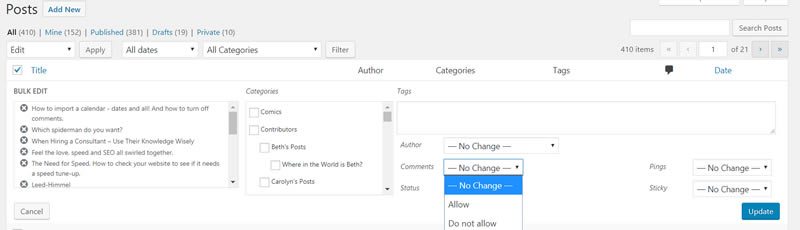
There is a feature in WordPress to turn off comments for all posts – including past posts.

Here’s how:

  1. Go to All Posts or in this case All Events.
  2. Click the checkbox that selects all the posts or events.
  3. Click and apply Edit under Bulk Actions dropdown.
  4. Set Comments to Do Not Allow
  5. Click Update

That should work in most cases, but it didn’t in this case. I think because of the way we imported the data through the subscription feed.

So here’s my go to fix in cases when WordPress won’t do as we’d like.

Change the display through CSS.

In this case I wanted to eliminate the display of the comment count and comment display box. To find out the CSS class that presents these options, right click on the area you want to eliminate, click “Inspect”. Look through the code to find the CSS classes that define the styles for these elements.

In this case it was  “.comment-text, .comment_meta-container, .comment_container, and .comment count”. So I added the following code to the CSS styles:

.comment-text,

.comment_meta-container,

.comment_container,

.comment-count {

display:none !important;

}

Wala! Comments section is gone.

Make sure you’re modifying your CSS by using the Custom CSS option of your theme instead of updating the themes original style sheet.


Filed Under: Carolyn's Posts, Featured, Wordpress Tutorials

  • « Previous Page
  • 1
  • …
  • 6
  • 7
  • 8
  • 9
  • 10
  • …
  • 41
  • Next Page »

Recent Posts

  • AI is the Greatest Thing for Writing…and the Worst – Part 2
  • AI is the Greatest Thing for Writing…and Also the Worst – Part 1
  • Non-Compliance Could Cost You $5,000 in Fines!
  • Blindly Embracing Technology
  • Improve Productivity, Save Energy and Reduce Waste!

Search this site

Call Us

860-432-8756

Our Location

222 Pitkin Street, Suite 125
East Hartford, CT 06108
Phone: 860-432-8756

Services

  • Marketing Services
  • Strategic Planning
  • Internet Marketing
  • Multi-Media Productions
  • Marketing Programs

Talk to Us

Follow us, subscribe to us, email us, or call us at 860-432-8756. We’ll use our Super Savvy Tool Belt to stay in touch however you prefer.

  • Email
  • Facebook
  • LinkedIn
  • Pinterest
  • Twitter
Sign Up for Email Updates
For Email Marketing you can trust.

Copyright © 2026 Web Savvy Marketers, LLC · 222 Pitkin Street, Ste. 125 · East Hartford, CT 06108 · 860-432-8756 ·
Privacy Policy | Terms & Conditions | Cookie Policy · Log in